Pandas for Sports Data: The 12 Operations You'll Use Constantly
Part 2 of 10 in Python Foundations for Sports Data · course bundle (code + data)
What you'll build
A cheat-sheet of the twelve pandas moves you'll reuse in every other tutorial.
I'll let you in on something that took me embarrassingly long to figure out: you don't need to know all of pandas. You need about twelve moves. Load a file, look at its shape, pick some columns, filter some rows, sort, group, join - that handful, recombined, is most of what I do in a real project. This page is those twelve, run one after another against the 2023 MLB standings (the final 30-team table, bundled as sample_standings.csv so it works completely offline). Every output you see below is the real thing the code printed on my machine.
Treat this one as a reference, not a read-once. I still keep it open in a tab and steal from it. It assumes you've already set up Python; the data is the 2023 regular-season standings I pulled from the MLB Stats API in June 2026 and saved next to the script.
-
Read a CSV and look at its shape (operations 1–2)
Everything starts with loading data.
pd.read_csvturns a comma-separated file into a DataFrame — a table with named columns and numbered rows. The first thing I check on any new table is its.shape, a quick(rows, columns)sanity check that I loaded what I expected.python import pandas as pd df = pd.read_csv("sample_standings.csv") print("Shape (rows, columns):", df.shape) print(df.head(5).to_string())30 teams, 11 columnsShape (rows, columns): (30, 11) Team Abbr League Division G W L WinPct RS RA RunDiff 0 Braves ATL NL NL East 162 104 58 0.642 947 716 231 1 Orioles BAL AL AL East 162 101 61 0.623 807 678 129 2 Dodgers LAD NL NL West 162 100 62 0.617 906 699 207 3 Rays TB AL AL East 162 99 63 0.611 860 665 195 4 Brewers MIL NL NL Central 162 92 70 0.568 728 647 81Thirty rows, eleven columns — one row per team, exactly right. The second operation is reading the column types with
.dtypes, because pandas guesses a type for each column and you want to confirm the numbers came in as numbers, not text.python print(df.dtypes)OutputTeam str Abbr str League str Division str G int64 W int64 L int64 WinPct float64 RS int64 RA int64 RunDiff int64 dtype: object
The text columns show as
strand the counts asint64;WinPctisfloat64. If a column you expected to be numeric showed up asstr, that's your signal something in the file needs cleaning — the whole subject of cleaning messy sports data. -
Select columns and filter rows (operations 3–4)
You rarely want every column at once. Passing a list of column names inside square brackets — note the double brackets — gives you just those, in that order.
python df[["Team", "W", "L", "RunDiff"]]Four columns, first five rowsTeam W L RunDiff 0 Braves 104 58 231 1 Orioles 101 61 129 2 Dodgers 100 62 207 3 Rays 99 63 195 4 Brewers 92 70 81
Filtering rows works differently: you write a condition that produces a column of True/False, then index the DataFrame with it. This "boolean mask" keeps only the rows where the condition is True. Here we keep teams with more wins than losses.
python winners = df[df["W"] > df["L"]] print("Teams with a winning record:", len(winners))OutputTeams with a winning record: 17 Team League W L 0 Braves NL 104 58 1 Orioles AL 101 61 2 Dodgers NL 100 62 3 Rays AL 99 63 4 Brewers NL 92 70Seventeen of the thirty teams finished above .500. The expression
df["W"] > df["L"]compares the two columns row by row; wrapping it indf[...]selects the matching rows. -
Sort, and add a computed column (operations 5–6)
sort_valuesreorders rows by a column. Passascending=Falseto put the biggest values on top — here, the best run differentials.python df.sort_values("RunDiff", ascending=False)[["Team", "RunDiff"]]Best run differentials firstTeam RunDiff 0 Braves 231 2 Dodgers 207 3 Rays 195 7 Rangers 165 5 Astros 129
Notice the row numbers on the left jump around (0, 2, 3, 7, 5) — sorting moves the rows but keeps each one's original index, a handy reminder that the index travels with the data. Operation six creates a brand-new column by assigning to a name that doesn't exist yet. We compute each team's Pythagorean win expectation, a classic estimate of deserved winning percentage from runs scored and allowed.
python df["PythagPct"] = (df["RS"] ** 2 / (df["RS"] ** 2 + df["RA"] ** 2)).round(3) df[["Team", "WinPct", "PythagPct"]]OutputTeam WinPct PythagPct 0 Braves 0.642 0.636 1 Orioles 0.623 0.586 2 Dodgers 0.617 0.627 3 Rays 0.611 0.626 4 Brewers 0.568 0.559
Compare the two columns: the Orioles' actual .623 sits well above their .586 expectation, the hallmark of a team that won more one-run games than the run math predicts.
-
Group and aggregate, then count categories (operations 7–8)
Grouping is the most powerful move here.
groupby("Division")splits the table into one bucket per division; chaining["RunDiff"].mean()then collapses each bucket to a single average. We round and sort the result.python by_div = df.groupby("Division")["RunDiff"].mean().round(1).sort_values(ascending=False) print(by_div.to_string())Average run differential by divisionDivision AL East 74.0 NL East 19.6 NL West 3.0 AL West -7.2 NL Central -13.8 AL Central -75.6
The AL East averaged a +74.0 run differential while the AL Central sat at −75.6 — a vivid picture of an unbalanced league. Operation eight,
value_counts, is the shortcut for "how many rows fall in each category," here confirming the 15-and-15 split between the two leagues.python print(df["League"].value_counts().to_string())OutputLeague NL 15 AL 15
-
Rename columns and describe the numbers (operations 9–10)
Source data rarely uses the column names you'd choose.
renametakes a dictionary mapping old names to new ones and returns a fresh DataFrame — here makingRSandRAhuman-readable.python renamed = df.rename(columns={"RS": "RunsScored", "RA": "RunsAllowed"}) print("New column names:", list(renamed.columns))OutputNew column names: ['Team', 'Abbr', 'League', 'Division', 'G', 'W', 'L', 'WinPct', 'RunsScored', 'RunsAllowed', 'RunDiff', 'PythagPct']
Operation ten,
describe, is the one-line summary I reach for on any numeric data: count, mean, standard deviation, min, max, and quartiles, all at once.python print(df[["W", "L", "RS", "RA"]].describe().round(1).to_string())Summary statisticsW L RS RA count 30.0 30.0 30.0 30.0 mean 81.0 81.0 747.7 747.7 std 13.1 13.1 82.9 82.1 min 50.0 58.0 585.0 647.0 25% 75.2 72.2 680.0 697.2 50% 82.0 80.0 742.5 721.0 75% 89.8 86.8 792.8 813.2 max 104.0 112.0 947.0 957.0
Two nice gut-checks fall out of this: average wins land at exactly 81.0 (half of a 162-game schedule, as they must across a whole league), and the highest run total of the season was 947.
-
Take the top N, and join another table (operations 11–12)
When you only want the leaders,
nlargestbeats sorting-then-slicing because it says exactly what you mean: the five rows with the most wins.python df.nlargest(5, "W")[["Team", "W", "RunDiff"]]Top five teams by winsTeam W RunDiff 0 Braves 104 231 1 Orioles 101 129 2 Dodgers 100 207 3 Rays 99 195 4 Brewers 92 81
Finally, the twelfth operation joins two tables. Real analysis constantly needs to attach extra information — here, a region label for each division. We build a small lookup DataFrame and
mergeit on the sharedDivisioncolumn.python regions = pd.DataFrame({ "Division": ["AL East", "AL Central", "AL West", "NL East", "NL Central", "NL West"], "Region": ["East", "Central", "West", "East", "Central", "West"], }) joined = df.merge(regions, on="Division", how="left") joined[["Team", "Division", "Region"]]OutputTeam Division Region 0 Braves NL East East 1 Orioles AL East East 2 Dodgers NL West West 3 Rays AL East East 4 Brewers NL Central Central
The
how="left"means "keep every row of the left table and attach a match where one exists," which is the join you'll want roughly nine times out of ten. This is the same merge that turns cryptic player IDs into names in the exit-velocity leaderboard. -
Turn a groupby into a chart
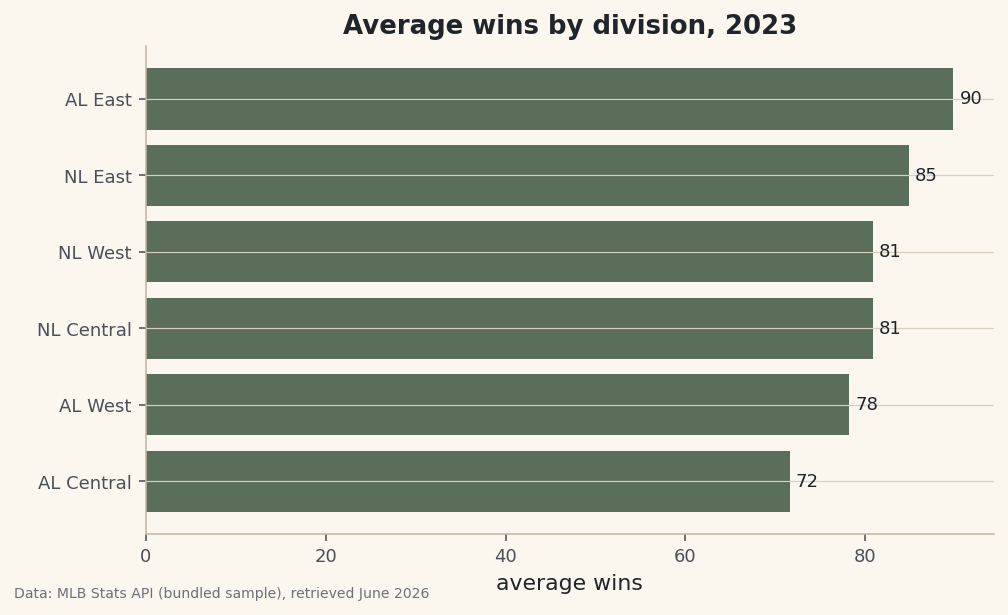
A summary is more persuasive as a picture. We reuse the grouping idea — average wins by division — and hand the result straight to matplotlib's horizontal bar chart. Sorting first makes the bars climb cleanly from bottom to top.
python import matplotlib.pyplot as plt wins = df.groupby("Division")["W"].mean().sort_values() fig, ax = plt.subplots(figsize=(7.6, 4.4)) ax.barh(wins.index, wins.values) ax.set_title("Average wins by division, 2023") ax.set_xlabel("average wins") ax.bar_label(ax.containers[0], fmt="%.0f", padding=3, fontsize=9) fig.savefig("wins_by_division.png", dpi=144, bbox_inches="tight")Data: Bundled sample (2023 MLB standings), retrieved June 2026 The same AL-East-on-top, AL-Central-at-the-bottom story from the run-differential numbers shows up instantly in bar length. That's the payoff of these twelve operations: a few lines take you from a raw CSV all the way to a finished, labeled chart.
Troubleshooting
FileNotFoundError when reading the CSV
pandas looked for sample_standings.csv relative to where you launched the script, not where the file lives. Either run the script from the folder that contains the CSV, or pass the full path. The downloadable script solves this by building an absolute path from its own location with os.path.dirname(os.path.abspath(__file__)).
KeyError: 'RunDiff'
pandas couldn't find a column by that exact name. Column names are case-sensitive and can carry stray spaces from the source file. Print list(df.columns) to see them exactly as loaded, and check for surprises like 'RunDiff ' with a trailing space — the kind of thing we fix in cleaning messy sports data.
SettingWithCopyWarning when adding a column
This appears when you assign to a column of a DataFrame that might be a slice of another one, so pandas can't tell if you meant to edit the original. If you filtered or selected before assigning, add .copy() at that step so you're clearly working on your own table, then add the column.
A numeric column behaves like text (string concatenation, not addition)
Run df.dtypes (operation 2). If a column shows str where you expected int64 or float64, a non-numeric character — a stray comma, a percent sign — forced it to text. Convert it with pd.to_numeric(df["col"], errors="coerce") after stripping the offending characters.
Challenge yourself
Combine several operations into one question: filter to the National League, group by division, and report the average run differential and the single best team by wins in each — then sort the result. For a stretch, join the Region lookup back on and produce average wins by region instead of by division. If you can chain those together cleanly, you've genuinely internalized these twelve moves.
The finished script
Everything this tutorial built, assembled in one runnable file.
Download the finished script (02_pandas_for_sports_data_12_operations.py)This script imports a small shared helper (and reads any bundled sample data) that live next to it in /downloads/ — grab these into the same folder so it runs as-is: sdt_common.py, sample_standings.csv. Or skip the collecting: the Python Foundations for Sports Data bundle has this whole course’s scripts and data in one ZIP.