Build a Standings Table from a Season of Game Results
Part 10 of 10 in Python Foundations for Sports Data · course bundle (code + data)
What you'll build
A full W-L standings table aggregated from a game-by-game results log.
The standings are an output, not an input. Underneath every win-loss table is a long, plain log of individual games — who played whom and who scored what — and turning that log into a standings table is one of the most common things you'll do with sports data. Take a full season of game results and you can collapse it into wins, losses, and win percentage with a single groupby. But there's a small reshape in front of that groupby that most beginners miss — every game row touches two teams — and, on this particular file, a better lesson hiding in front of that: the log contains one game more than a season should, and finding it before you aggregate is the difference between reconstructing the standings and almost reconstructing them.
This builds on Group, Pivot, Reshape. The data is the bundled nba_home_results.csv — a real season of game results (date, home/away team, and each side's points), retrieved from Basketball-Reference — so it runs offline.
-
Look at the game log
Each row is one game and touches two teams — one home, one away. That's the wrinkle: to count a team's results we need to see it whether it was home or away.
python import pandas as pd games = pd.read_csv("nba_home_results.csv") # columns: date, away_team, away_pts, home_team, home_ptsIf we only ever looked at the
home_teamcolumn we'd capture half of each team's season and miss the other half. So we'll reshape. But not yet — first, a check most people skip. -
Count the games before you trust them
Before aggregating anything, test the file against a number you can derive without it. Thirty NBA teams play 82 games each, and every game involves two teams, so a full season is 30 × 82 / 2 = 1,230 games. Ask the file how many rows it has — and when the answer disagrees, don't shrug: find out which teams are over-counted by stacking both team columns and counting appearances.
python print("Games in the file:", len(games)) # a full season is 30 * 82 / 2 = 1230 appearances = pd.concat([games["home_team"], games["away_team"]]).value_counts() print(appearances[appearances > 82])One game too manyGames in the file: 1231 (30 teams x 82 games / 2 = 1230) Teams appearing in more than 82 games: Indiana Pacers 83 Los Angeles Lakers 83
There's the anomaly: 1,231 games, and exactly two teams — the Pacers and the Lakers — appear 83 times. One extra game, shared by those two teams. If we'd aggregated blindly, both would have been credited with an 83rd game the official standings don't contain.
-
Identify the extra game and exclude it
Pull every meeting between the two over-counted teams and look at it. Three rows come back; two are their normal home-and-home regular-season pair, both from late March. The odd one out is December 9, 2023 — and a date check outside the data explains it: that's the In-Season Tournament final, played in Las Vegas. It's a real game (the Lakers won it, 123–109), but the NBA does not count it in the 82-game regular-season standings — so a faithful reconstruction has to drop it, and say so.
python over = appearances[appearances > 82].index head_to_head = games[games["home_team"].isin(over) & games["away_team"].isin(over)] print(head_to_head.to_string(index=False)) # 2023-12-09 is the In-Season Tournament final - a real game, but not part of # the 82-game regular season, so the official standings exclude it. So do we. ist_final = head_to_head[head_to_head["date"] == "2023-12-09"] games = games.drop(ist_final.index)Three meetings, one impostordate away_team away_pts home_team home_pts 2023-12-09 Indiana Pacers 109 Los Angeles Lakers 123 2024-03-24 Indiana Pacers 145 Los Angeles Lakers 150 2024-03-29 Los Angeles Lakers 90 Indiana Pacers 109
This is the move to internalize: the anomaly wasn't a typo or a corruption — it was a rule the dataset didn't know about. No amount of pandas can tell you the IST final doesn't count; that knowledge lives in the sport, not the CSV. The code's job was to surface the discrepancy precisely enough that one targeted question ("what happened on 2023-12-09?") answered it.
-
One row per team, per game
We build the log twice — once from the home team's point of view, once from the away team's — renaming each side's points to neutral
pf(points for) andpa(points against). Stack them and every team now has one row for every game it played.python home = games.rename(columns={"home_team": "team", "home_pts": "pf", "away_pts": "pa"})[["team", "pf", "pa"]] away = games.rename(columns={"away_team": "team", "away_pts": "pf", "home_pts": "pa"})[["team", "pf", "pa"]] long = pd.concat([home, away], ignore_index=True) long["win"] = (long["pf"] > long["pa"]).astype(int)The
wincolumn is a boolean (pf > pa) turned into 1 or 0 with.astype(int)— which makes the next step trivial, because summing a column of 1s and 0s just counts the wins. -
One groupby builds the table
Group by team, sum the wins, count the games, and the standings fall out.
python standings = (long.groupby("team") .agg(W=("win", "sum"), G=("win", "count")) .reset_index()) standings["L"] = standings["G"] - standings["W"] standings["WinPct"] = (standings["W"] / standings["G"]).round(3) standings = standings.sort_values("W", ascending=False) print(standings[["team", "W", "L", "WinPct"]].head(8).to_string())Standings, rebuilt from the game logReconstructed standings from 1230 games: team W L WinPct 1 Boston Celtics 64 18 0.780 7 Denver Nuggets 57 25 0.695 20 Oklahoma City Thunder 57 25 0.695 17 Minnesota Timberwolves 56 26 0.683 12 Los Angeles Clippers 51 31 0.622 6 Dallas Mavericks 50 32 0.610 19 New York Knicks 50 32 0.610 16 Milwaukee Bucks 49 33 0.598From a flat list of 1,230 games, two lines produced the league table — the Celtics on top at 64–18 (.780), with Denver and Oklahoma City tied behind them. And because we caught the impostor row first, the reconstruction is exact, which we can prove rather than assert: every team should sit on precisely 82 games, and the two teams the extra game had inflated should land on their official records.
python print("Every team at exactly 82 games:", bool((standings["G"] == 82).all())) print(standings[standings["team"].isin(over)][["team", "W", "L", "WinPct"]] .to_string(index=False))The proof of the exclusionEvery team at exactly 82 games: True team W L WinPct Los Angeles Lakers 47 35 0.573 Indiana Pacers 47 35 0.573Both at 47–35 — exactly the official 2023-24 records for the Lakers and the Pacers. Had we skipped the anomaly check, the table would have read 48–35 and 47–36 on 83 games each: close enough to look right, wrong enough to be wrong. That near-miss quality is what makes silent data errors dangerous, and row-count arithmetic is the cheapest alarm there is.
-
Chart the standings
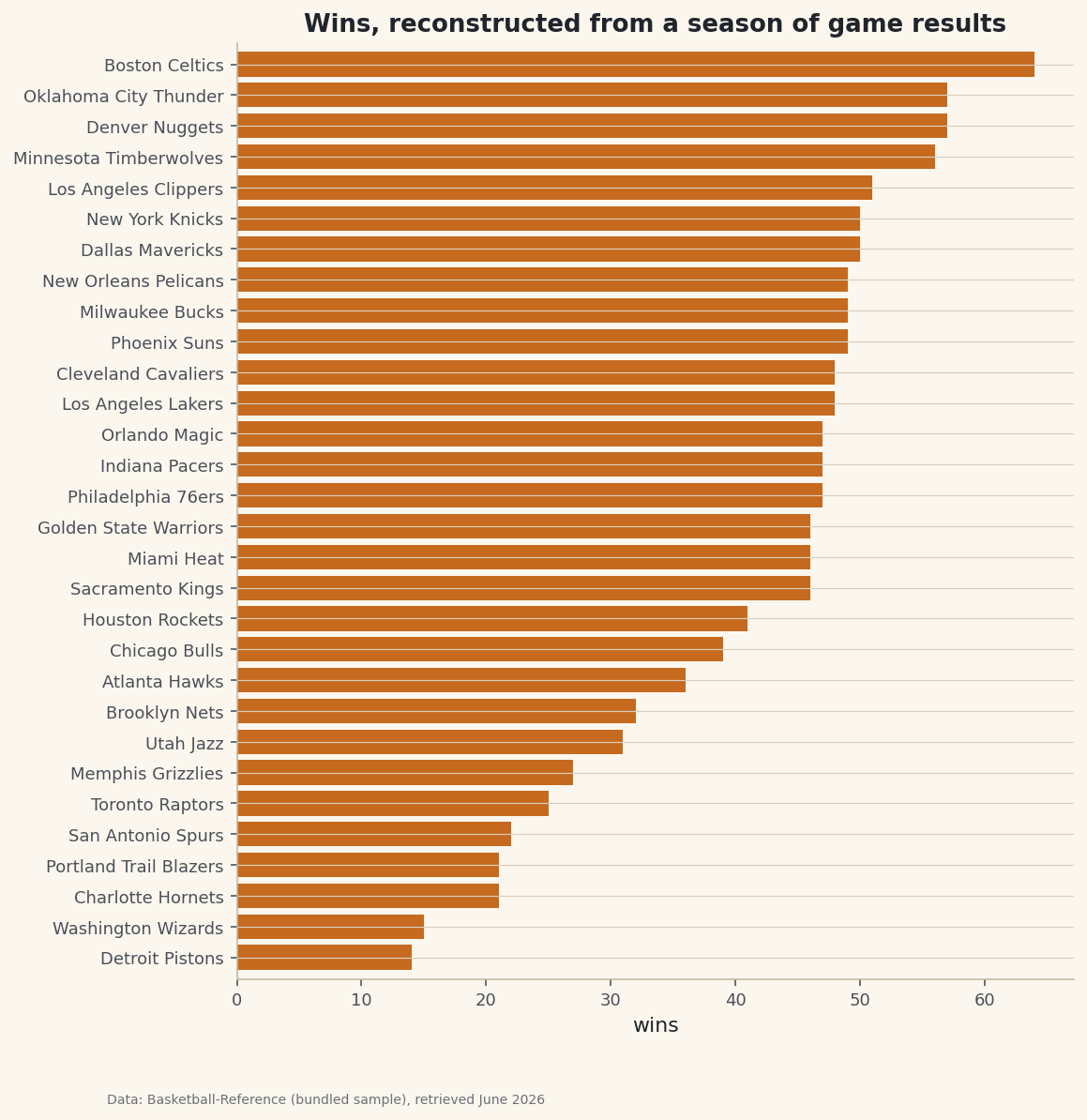
python import matplotlib.pyplot as plt ordered = standings.sort_values("W") # ascending so the best record lands on top fig, ax = plt.subplots(figsize=(8, 9)) ax.barh(ordered["team"], ordered["W"]) ax.set_xlabel("wins") fig.savefig("wins_bar.png", dpi=144, bbox_inches="tight")Data: Bundled sample (NBA game results), retrieved June 2026 The same standings, now ranked at a glance. Everything in this chart was computed from raw scores — we never needed a pre-made standings table at all.
Troubleshooting
Every team's win total is about half what it should be
You aggregated only the home (or only the away) rows. Each team plays home and away, so you must build both perspectives and concat them before grouping — that's the whole point of the reshape step.
Some team names appear twice in the standings
The same franchise is spelled inconsistently in the log (an abbreviation in some rows, a full name in others, or a stray space). groupby treats those as different teams. Standardize the names first — see Cleaning Messy Sports Data.
So is the bundled file wrong?
No — it's complete, which is a different thing. It genuinely contains 1,231 games: the 1,230-game regular season plus the In-Season Tournament final, which really was played. Whether that row belongs depends on your question — official standings exclude it, but a "how good was this team" model might keep it. The skill this tutorial teaches is noticing that the choice exists at all, and making it deliberately.
What about tie games?
Basketball has no ties, so pf > pa is safe here. In a sport that allows draws (soccer, hockey regulation), add a third case — e.g., assign 1/0/0.5 or count wins, draws, and losses separately — rather than forcing every game into win-or-loss.
Challenge yourself
Extend the aggregation to add points for and against: in the same .agg, sum pf and pa, then compute a points differential column and sort by it. Does the differential order match the win order? Then split the season into home and away records (group by team and by whether the row came from the home frame) to see who was a genuine road warrior.
Take the script home
The finished script behind this tutorial is the one that was run to produce its figures and printouts; download it and run it yourself.
Download the finished script (45_build_a_standings_table_from_results.py)This script imports a small shared helper (and reads any bundled sample data) that live next to it in /downloads/ — grab these into the same folder so it runs as-is: sdt_common.py, sdt_nba.py. Or skip the collecting: the Python Foundations for Sports Data bundle has this whole course’s scripts and data in one ZIP.