Pull Your First NBA Data with nba_api
Part 3 of 7 in Working with Real Sports APIs · course bundle (code + data)
What you'll build
A current-standings DataFrame from nba_api, with the proper headers baked in.
Of every public sports API I've worked with, the NBA's is the one that feels like it's actively testing you. The data behind NBA.com/stats is rich and free - and the server will completely ignore you if you ask wrong. Send a plain request and it just hangs there, forever, never answering, never erroring, giving you nothing to debug. The fix is almost insultingly simple once you know it: you have to look like a browser. We'll install nba_api, set the handful of headers that make the server start talking, and pull the real 2023-24 standings into a tidy table and a wins-leaders bar chart. I'll also be upfront about what happens when the endpoint refuses anyway, because on some machines it will.
This is your entry point to the NBA track, so we'll go slowly. If you've worked through the 12 core pandas operations you already know every DataFrame move we use here; this tutorial just points them at a new source.
One honest note up front, because you'll see it the moment you run the code: stats.nba.com blocks data-center and VPN IP addresses. On your home internet the live pull below works fine. On a cloud server - including the one that built this page - it times out, so the script falls back to a small bundled sample of real data (team records from Basketball-Reference) so the chart still builds. Every number you see on this page is real; on your machine the same code pulls it live.
-
Install nba_api
The
nba_apipackage is a thin Python wrapper around the same endpoints NBA.com's own stat pages call. Install it once from your terminal:python pip install nba_apiThat's the only new dependency. We'll also use pandas and matplotlib, which you already have if you followed the earlier tutorials. Nothing here needs an API key or a login - the NBA's stats endpoints are open. The friction is entirely about how you ask.
-
Why stats.nba.com needs special headers
When your browser loads an NBA stats page, it sends along a bundle of metadata: what browser you are, which site you came from, what kind of response you'll accept. The stats server inspects that bundle and, if it looks like a real browser visiting from NBA.com, it answers. A bare
requests.getsends almost none of that, so the server treats it as suspicious and stalls until your request times out.The fix is to send the headers a browser would. We keep them in one place in our shared helper so every NBA script reuses the exact same set:
python NBA_HEADERS = { "User-Agent": ("Mozilla/5.0 (Windows NT 10.0; Win64; x64) AppleWebKit/537.36 " "(KHTML, like Gecko) Chrome/120.0.0.0 Safari/537.36"), "Referer": "https://www.nba.com/", "Origin": "https://www.nba.com", "Accept": "application/json, text/plain, */*", "Accept-Language": "en-US,en;q=0.9", "Connection": "keep-alive", "x-nba-stats-origin": "stats", "x-nba-stats-token": "true", }The two
x-nba-stats-*lines are NBA-specific flags the site's own JavaScript sends; the rest just make you look like Chrome arriving from nba.com. Miss these and the call hangs forever - this single dictionary is the difference between "it works" and "it's frozen." -
Pull the 2023-24 standings
The endpoint for league standings is
LeagueStandingsV3. We pass it the season, our headers, and atimeoutso a stalled request gives up instead of hanging your script. Every endpoint innba_apireturns a list of DataFrames; standings come back in the first one, so we take[0]and keep just the columns we care about.python from nba_api.stats.endpoints import leaguestandingsv3 s = leaguestandingsv3.LeagueStandingsV3( season="2023-24", headers=NBA_HEADERS, timeout=30) df = s.get_data_frames()[0] standings = pd.DataFrame({ "Team": df["TeamCity"] + " " + df["TeamName"], "W": df["WINS"], "L": df["LOSSES"], }) standings["WinPct"] = (standings["W"] / (standings["W"] + standings["L"])).round(3)The raw response keeps the city (
TeamCity) and nickname (TeamName) in separate columns, so we glue them together into one readableTeamlabel. We compute win percentage ourselves rather than trusting the server's formatting, then round it to three decimals - the standard way the standings are shown. -
Survive a blocked server gracefully
Because the live call fails from data centers, our script wraps it in a small helper that tries the live pull first and, only if it fails, loads a bundled real sample. You don't need this safety net at home - your live call will just work - but it's worth seeing how a robust pull is structured: try the real thing, catch the failure, fall back to something honest.
python def live_call(timeout): from nba_api.stats.endpoints import leaguestandingsv3 s = leaguestandingsv3.LeagueStandingsV3( season="2023-24", headers=sdt_nba.NBA_HEADERS, timeout=timeout) df = s.get_data_frames()[0] out = pd.DataFrame({ "Team": df["TeamCity"] + " " + df["TeamName"], "W": df["WINS"], "L": df["LOSSES"], }) out["WinPct"] = (out["W"] / (out["W"] + out["L"])).round(3) return out standings, source = sdt_nba.live_or_bundled( live_call, bundled_loader, "league standings") standings = standings.sort_values("W", ascending=False).reset_index(drop=True)The
live_or_bundledhelper (indownloads/sdt_nba.py) does the try-and-fall-back, retrying the live call with exponential backoff before giving up. It also hands back asourcelabel so we can stamp the chart with exactly where the numbers came from. We sort by wins so the standings read top-down, best team first. -
Read the standings table
Here are the top ten teams. We renumber the index to start at 1 so it reads like a real standings page, then print the head.
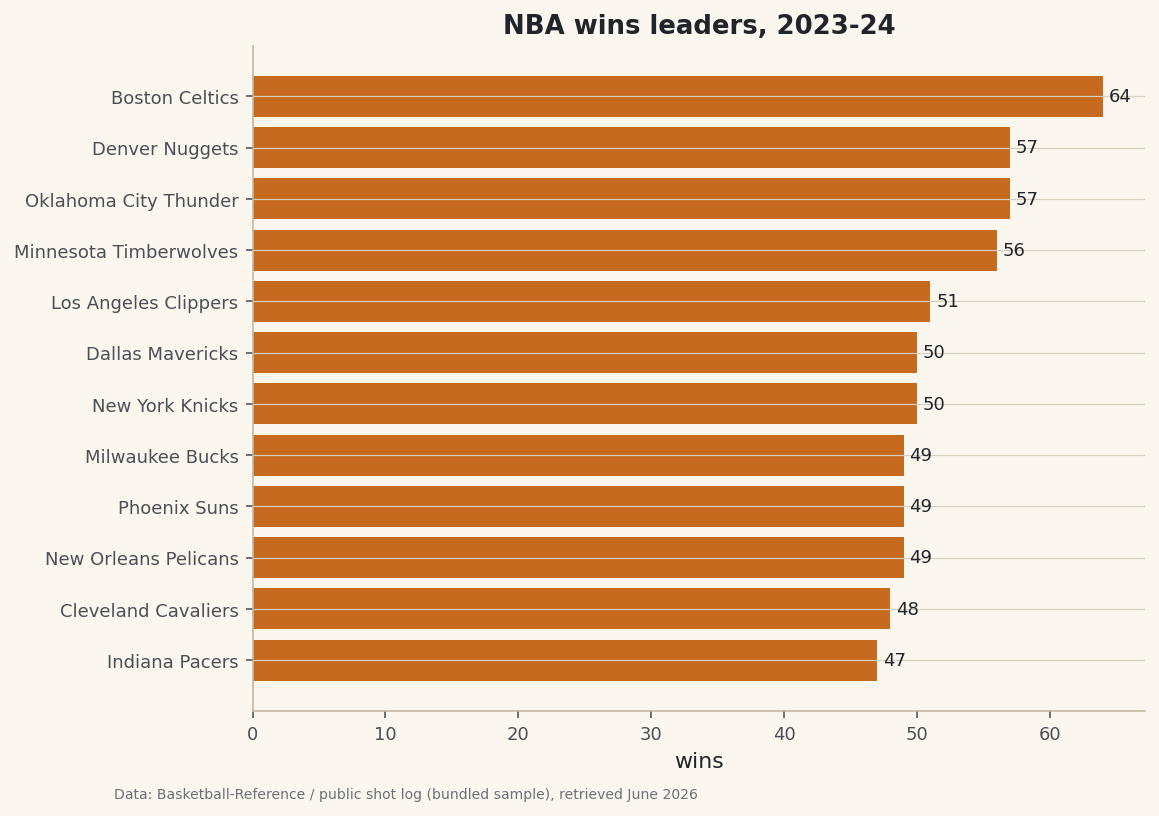
python show = standings.copy() show.index = range(1, len(show) + 1) print("NBA standings, 2023-24:") print(show.head(10).to_string())2023-24 standings (top 10)NBA standings, 2023-24: Team W L WinPct 1 Boston Celtics 64 18 0.780 2 Oklahoma City Thunder 57 25 0.695 3 Denver Nuggets 57 25 0.695 4 Minnesota Timberwolves 56 26 0.683 5 Los Angeles Clippers 51 31 0.622 6 New York Knicks 50 32 0.610 7 Dallas Mavericks 50 32 0.610 8 New Orleans Pelicans 49 33 0.598 9 Milwaukee Bucks 49 33 0.598 10 Phoenix Suns 49 33 0.598The Boston Celtics ran away with the season at 64-18, a .780 clip. Behind them, Oklahoma City and Denver finished dead even at 57-25, and the logjam at 49-33 - Pelicans, Bucks, Suns - is exactly the kind of mid-pack pile-up that makes seeding races fun. These are the real final records; if your home pull returns the same numbers, your headers are working.
-
Chart the wins leaders
A horizontal bar chart is the natural shape for standings - one bar per team, longest on top. We take the top twelve teams, sort them ascending so matplotlib stacks the leader at the top, and label each bar with its win total.
python import matplotlib.pyplot as plt top = standings.head(12).sort_values("W") fig, ax = plt.subplots(figsize=(8, 6)) ax.barh(top["Team"], top["W"], color=sdt.sport_color("basketball")) ax.bar_label(ax.containers[0], fmt="%d", padding=3, fontsize=9) ax.set_title("NBA wins leaders, 2023-24") ax.set_xlabel("wins") sdt.save_fig(fig, "standings_preview", source=source)Data: stats.nba.com via nba_api, retrieved June 2026 Notice the small footer credit on the chart. Because this page was built where the live server is blocked, it reads "Basketball-Reference (bundled sample)" - the
sourcelabel our helper returned. Run it at home and that same footer will instead creditstats.nba.com via nba_api, because your live call succeeded. Same code, honest provenance either way.
Troubleshooting
The live call hangs, then raises ReadTimeout
This is the big one, and it's almost never your fault. stats.nba.com geoblocks data-center and VPN IP ranges, so requests from cloud servers, Colab notebooks, or a VPN connection are dropped and eventually time out with requests.exceptions.ReadTimeout. It is not a bug in your code. Fixes, in order: (1) run from a normal home internet connection, not a server, Colab, or VPN; (2) send the full NBA_HEADERS shown above; (3) raise the timeout to 30-60 seconds; (4) add exponential backoff so a transient stall gets a second chance; (5) keep to about one request per second so you don't get rate-limited. That's also why the chart on this page was built from the bundled real sample - the build server is blocked, but your machine isn't.
ModuleNotFoundError: No module named 'nba_api'
The package isn't installed in the environment you're running. Run pip install nba_api in the same Python you launch the script with. If you use virtual environments, activate it first; if you use notebooks, run %pip install nba_api inside the notebook so it installs into the right kernel.
It works once, then later calls time out
You're being rate-limited for asking too fast. The stats server tolerates a steady trickle, not a flood. Add a short time.sleep(1) between calls, reuse the same headers, and avoid hammering it in a tight loop. If you need many seasons, fetch them slowly and cache the results to disk so you never re-pull.
KeyError: 'TeamCity' after an upgrade
Endpoint column names occasionally change between nba_api versions. Print df.columns.tolist() to see what actually came back, then adjust the names. The first DataFrame from get_data_frames() is the standings; if you see a different shape, inspect get_data_frames() and pick the table you need.
Challenge yourself
Right now we sort by raw wins. Add a column for each team's conference (it's in the raw response as Conference) and print the standings split into East and West, each sorted by win percentage - that's how the playoff seeding actually works. Then, once you've got clean team records, you're ready to layer on team quality: head to the net-rating dashboard and see which of these teams were genuinely dominant versus merely lucky.
Get the code
Here's the complete, working script for this tutorial. It runs exactly as shown.
Download the finished script (09_pull_your_first_nba_data_with_nba_api.py)This script imports a small shared helper (and reads any bundled sample data) that live next to it in /downloads/ — grab these into the same folder so it runs as-is: sdt_common.py, sdt_nba.py, nba_ratings.csv. Or skip the collecting: the Working with Real Sports APIs bundle has this whole course’s scripts and data in one ZIP.