Pull Your First MLB Data with pybaseball
Part 2 of 7 in Working with Real Sports APIs · course bundle (code + data)
What you'll build
Your first real Statcast pull, cached, with an exit-velocity histogram.
The single best thing about baseball analytics is that the richest data in all of sports is free and sitting right there. Statcast - the camera-and-radar rig bolted into every MLB park, tracking the speed and spin and launch angle of literally every pitch and batted ball - is one Python import away. No API key, no scraping, no paywall. We'll install pybaseball, turn caching on so we're polite about it, pull a real week of pitches, and sit with the one fact that reframes how you think about this data: every row is one pitch. Then we'll chart how hard a week of big-league hitters actually struck the ball, just to prove the data is genuinely there.
This assumes you've already set up Python for sports analytics and worked through the twelve core pandas operations. If import pandas works on your machine, you're ready. The data here comes from Baseball Savant via pybaseball, retrieved June 2026.
-
Install pybaseball
pybaseball is a community library that wraps Baseball Savant, FanGraphs, and Baseball-Reference behind tidy Python functions. Install it once from your terminal:
python pip install pybaseballThat pulls in pandas and a few helpers if you don't already have them. Everything else in this tutorial happens inside a single Python script.
-
Turn on caching - be a good citizen
Before we download anything, we enable pybaseball's on-disk cache. This is the most important habit in this whole series: a cache means that the second time you run your script, the data loads from your own hard drive instead of hitting Baseball Savant's servers again. You get a faster script and you stop hammering a free public resource that the whole community shares.
python import matplotlib.pyplot as plt import pybaseball as pyb # Be a good citizen: cache every pull to disk. Run once, and the data is reused after. pyb.cache.enable()You only ever need to call
pyb.cache.enable()once, near the top of your script. From then on, identical requests are served from disk. Think of it as the courteous default for any data pull, not an optimization you bolt on later. -
Pull a week of Statcast data
The function
statcast(start, end)downloads every tracked pitch between two dates. We'll grab the first week of June 2023. Behind the scenes, Statcast splits this into one request per day - so a week is seven requests the first time, and zero the next time thanks to our cache.python # One week of the 2023 season. Statcast splits this into one request per day. data = pyb.statcast("2023-06-01", "2023-06-07")When you run this for the first time you'll see a small progress bar tick through the seven days. That's expected; give it twenty or thirty seconds. The result,
data, is an ordinary pandas DataFrame - just a very wide one. -
See how big - and how wide - the data is
Let's look at the shape before anything else. The number of rows will surprise people who expect "a week of baseball" to be small.
python print("Rows (one per pitch):", f"{len(data):,}") print("Columns:", data.shape[1])OutputRows (one per pitch): 25,714 Columns: 118
Over twenty-five thousand rows for a single week, and more than a hundred columns per row. That's the headline lesson of this tutorial: each row is one pitch, not one game and not one player. A typical MLB game has around 300 pitches, and a week has dozens of games, so the rows add up fast. Every one of those 118 columns describes some measured property of that single pitch - its speed, its spin, where it crossed the plate, and, if it was hit, how hard and at what angle it left the bat.
-
Look at a handful of real pitches
A hundred-plus columns is too many to read at once, so we'll pick six that tell a clear story and print a few rows. We also drop pitches that were never put in play, because we want to see batted-ball numbers here.
python cols = ["game_date", "player_name", "events", "launch_speed", "launch_angle", "pitch_type"] sdt.show_df(data[cols].dropna(subset=["launch_speed"]), n=6)Six real pitches that were put in playgame_date player_name events launch_speed launch_angle pitch_type 2038 2023-06-07 Chafin, Andrew force_out 104.2 -19 FF 2627 2023-06-07 Chafin, Andrew single 83.9 21 SI 2926 2023-06-07 Chafin, Andrew single 98.8 11 FF 3206 2023-06-07 Chafin, Andrew NaN 47.2 -24 SL 2229 2023-06-07 Weems, Jordan field_out 102.5 38 SL 2334 2023-06-07 Weems, Jordan NaN 71.7 23 FF
Read one row at a time. The first is a pitch from Andrew Chafin - a four-seam fastball (
FF) that was hit at 104.2 mph and turned into a force out. Theplayer_namecolumn here is the pitcher, a quirk of Statcast worth remembering. Theeventscolumn is empty (NaN) on pitches that didn't end a plate appearance, which is why some batted balls show no event. Andlaunch_speed- exit velocity in miles per hour - is the column we'll build the rest of this tutorial on. -
Keep only the batted balls
To talk about exit velocity, we need pitches that were actually struck. A pitch that was taken for a ball has no exit velocity, so its
launch_speedisNaN. Dropping those rows leaves us with the batted balls, and a quick summary tells us we're in sane territory.python # "launch_speed" is exit velocity in mph. Keep the rows that are actually batted balls. batted = data.dropna(subset=["launch_speed"]) print("Batted balls this week :", f"{len(batted):,}") print("Average exit velocity :", round(batted["launch_speed"].mean(), 1), "mph") print("Hardest-hit ball :", round(batted["launch_speed"].max(), 1), "mph")OutputBatted balls this week : 8,324 Average exit velocity : 83.0 mph Hardest-hit ball : 116.6 mph
Eight thousand batted balls in a week, averaging 83.0 mph off the bat, with the hardest one clocked at 116.6 mph. That top number is the kind of rocket only a few hitters in the world can produce, and seeing it confirms the pipeline is pulling genuine Statcast measurements - not something we could have invented.
-
Chart the distribution of exit velocity
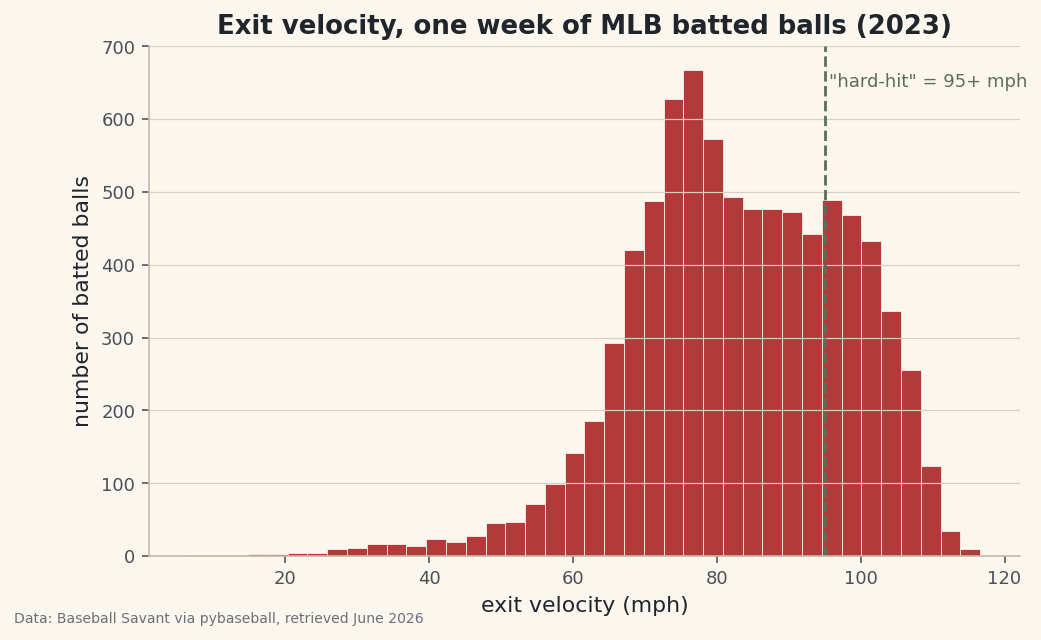
A single average hides the shape of the data. A histogram shows it: we bucket every batted ball by how hard it was hit and count how many landed in each bucket. We'll also draw a dashed line at 95 mph, the conventional threshold for a "hard-hit" ball.
python fig, ax = plt.subplots(figsize=(7.8, 4.6)) ax.hist(batted["launch_speed"], bins=40, color=sdt.sport_color("baseball"), edgecolor="#FBF7EE", linewidth=0.4) ax.axvline(95, color=sdt.SPORT_COLORS["foundations"], linestyle="--", linewidth=1.4) ax.text(95.6, ax.get_ylim()[1] * 0.92, '"hard-hit" = 95+ mph', fontsize=9, color=sdt.SPORT_COLORS["foundations"]) ax.set_title("Exit velocity, one week of MLB batted balls (2023)") ax.set_xlabel("exit velocity (mph)") ax.set_ylabel("number of batted balls") fig.savefig("exit_velo_hist.png", dpi=144, bbox_inches="tight")Data: Baseball Savant via pybaseball, retrieved June 2026 Notice the shape: it isn't a tidy bell curve. There's a long tail of soft contact on the left - mishit grounders and broken-bat bloopers - and a denser cluster of hard contact bunched up near the right edge, because there's a physical ceiling on how hard a human can hit a baseball. The 95 mph line shows you, at a glance, what fraction of contact counts as "hard-hit." That single picture is the foundation for a lot of hitting analysis.
Troubleshooting
ModuleNotFoundError: No module named 'pybaseball'
The install didn't land in the same Python you're running. Make sure your virtual environment is activated, then run pip install pybaseball again. You can confirm with python -c "import pybaseball" - no output means success.
The first pull is slow or shows a progress bar
That's normal, not a bug. statcast() makes one request per day, so a week is seven requests the first time. Because we called pyb.cache.enable(), the second run reads from disk and is nearly instant. Give the first run twenty to thirty seconds before worrying.
An empty DataFrame or zero rows
Almost always a date problem: you picked an off-day, the All-Star break, or a date in the future. Pick a range inside a regular season (the 2023 season runs roughly April through September) and check len(data) is non-zero before going further.
SSLError or a connection timeout
Baseball Savant occasionally hiccups. Because the cache is on, just run the script again - any days that already downloaded will load from disk, and only the missing ones retry. A flaky network is exactly why caching is the first thing we turned on.
Challenge yourself
Compute the share of this week's batted balls that were "hard-hit" (95 mph or more) - it's one line with a boolean mask and .mean(). Then pull a different week, run the same summary, and compare: does average exit velocity move much week to week, or is it remarkably stable? When you're comfortable, head to building an exit-velocity leaderboard and turn these pitches into a ranking of the hardest-hitting players.
Get the code
Want it all in one file? This is the finished script behind this tutorial - the run that produced the outputs above.
Download the finished script (06_pull_your_first_mlb_data_with_pybaseball.py)This script imports a small shared helper (and reads any bundled sample data) that live next to it in /downloads/ — grab these into the same folder so it runs as-is: sdt_common.py. Or skip the collecting: the Working with Real Sports APIs bundle has this whole course’s scripts and data in one ZIP.