How to Read API Documentation: A Sports Data Field Guide
Part 1 of 7 in Working with Real Sports APIs · course bundle (code + data)
What you'll build
A live pull from the public NHL API turned into a tidy standings DataFrame.
Here's the skill almost no beginner tutorial teaches, and it's the one that unlocks everything: reading API documentation. The moment the data you want stops living in a tidy CSV and starts living behind a web request, the docs are your only map - and most people freeze, because docs are written for people who already know the vocabulary. So let's learn the vocabulary. Find the endpoint, understand the parameters, send one request, read the status code, figure out the shape of the JSON that comes back. That's the whole game, and it transfers to nearly every data source on the internet.
We'll practice on the friendliest example I know - the public NHL API at api-web.nhle.com, which needs no key, no signup, nothing - and turn its standings into a table and a chart (numbers retrieved June 2026). The one idea to hold onto: an API is a contract. The docs spell out both halves of the deal - what you send, and what you get back. This leans on the pandas tutorial for the final step, where we pour the response into a DataFrame; if you later want this same pull as a clean, standalone script, that's the NHL data tutorial.
-
Read the docs: endpoint, parameters, status codes
Every API doc, however it's laid out, is answering four questions. It's worth knowing them by name so you can scan any documentation quickly:
- Base URL — the address every request starts with. For the NHL API that's
https://api-web.nhle.com. - Endpoint (path) — the specific resource you want, appended to the base. We'll use
/v1/standings/now, which the docs describe as the current standings. - Parameters — the knobs you turn, either baked into the path (like a date) or added as
?key=valuequery strings. Thenowin our path is itself a parameter meaning "the latest." - Status codes — the number the server returns to say how it went.
200means success;404means the path is wrong;429means you're sending too fast;500-range codes mean the server itself stumbled.
We set up the request with a base URL and a session that sends a normal browser User-Agent and retries automatically on the flaky status codes — a small politeness that keeps you from hammering a server and helps you survive the occasional hiccup. We also cache the response to a file so re-runs don't re-hit the API at all.
python import json, os import pandas as pd import sdt_common as sdt BASE = "https://api-web.nhle.com" session = sdt.polite_session(referer="https://www.nhl.com/") resp = session.get(f"{BASE}/v1/standings/now", timeout=30) resp.raise_for_status() # turn a bad status code into a clear error payload = resp.json()That
raise_for_status()line is small but important: instead of quietly carrying on with a 404 error page, it stops immediately with a clear exception the moment the status code isn't a success. Read errors loudly, fail early. - Base URL — the address every request starts with. For the NHL API that's
-
Inspect the shape before trusting it
The biggest difference from a CSV is that JSON is nested — dictionaries inside lists inside dictionaries — and the docs don't always make the exact shape obvious. So the first thing I do with any response is interrogate it: what are the top-level keys, and what does one record look like? We know from the docs that the teams live under the
"standings"key.python teams = payload["standings"] print("Top-level keys:", list(payload.keys())) print("Number of teams:", len(teams)) print("\nFields on one team (a few of many):") one = teams[0] for key in ["teamName", "divisionName", "points", "wins", "losses", "goalFor", "goalAgainst"]: print(f" {key}: {one[key]}")The shape of the responseTop-level keys: ['wildCardIndicator', 'standingsDateTimeUtc', 'standings'] (HTTP 200 from the API) Number of teams: 32 Fields on one team (a few of many): teamName: {'default': 'Colorado Avalanche', 'fr': 'Avalanche du Colorado'} divisionName: Central points: 121 wins: 55 losses: 16 goalFor: 302 goalAgainst: 203This little print-out tells us a lot. The payload has three top-level keys, the data we want is a list of 32 teams, and the leader at the time of retrieval was the Colorado Avalanche with 121 points. Look closely at
teamName, though: it isn't a plain string but a dictionary,{'default': 'Colorado Avalanche', 'fr': 'Avalanche du Colorado'}. That's the wrinkle the docs warn about, and the next step handles it. -
Navigate the nested fields
Several fields —
teamName,teamAbbrev— are little dictionaries keyed by language, where the value we want lives under"default". To reach the team's name you chain two lookups:t["teamName"]["default"]means "from teamt, take theteamNamedictionary, then take itsdefaultentry." Flat fields likepointsandwinswe read directly. We build one clean dictionary per team with a comprehension and hand the list to pandas.python rows = [{ "Team": t["teamName"]["default"], "Abbr": t["teamAbbrev"]["default"], "Conference": t["conferenceName"], "Division": t["divisionName"], "GP": t["gamesPlayed"], "W": t["wins"], "L": t["losses"], "OTL": t["otLosses"], "PTS": t["points"], "GF": t["goalFor"], "GA": t["goalAgainst"], } for t in teams] df = pd.DataFrame(rows).sort_values("PTS", ascending=False).reset_index(drop=True) print(df.head(8).to_string())Nested JSON, now a flat tableTeam Abbr Conference Division GP W L OTL PTS GF GA 0 Colorado Avalanche COL Western Central 82 55 16 11 121 302 203 1 Carolina Hurricanes CAR Eastern Metropolitan 82 53 22 7 113 296 240 2 Dallas Stars DAL Western Central 82 50 20 12 112 279 226 3 Buffalo Sabres BUF Eastern Atlantic 82 50 23 9 109 288 241 4 Tampa Bay Lightning TBL Eastern Atlantic 82 50 26 6 106 290 231 5 Montréal Canadiens MTL Eastern Atlantic 82 48 24 10 106 283 256 6 Minnesota Wild MIN Western Central 82 46 24 12 104 272 240 7 Boston Bruins BOS Eastern Atlantic 82 45 27 10 100 272 250
That's the whole art of consuming an API: read the docs for the shape, reach into the nesting with chained keys, and flatten each record into a row. The Avalanche lead with 121 points, the Hurricanes follow at 113, and a tidy eleven-column table has emerged from a deeply nested blob. Note the names survive correctly with accents intact — Montréal Canadiens reads as it should — because we pulled the proper Unicode string rather than mangling it.
-
Make the pull feel real with a chart
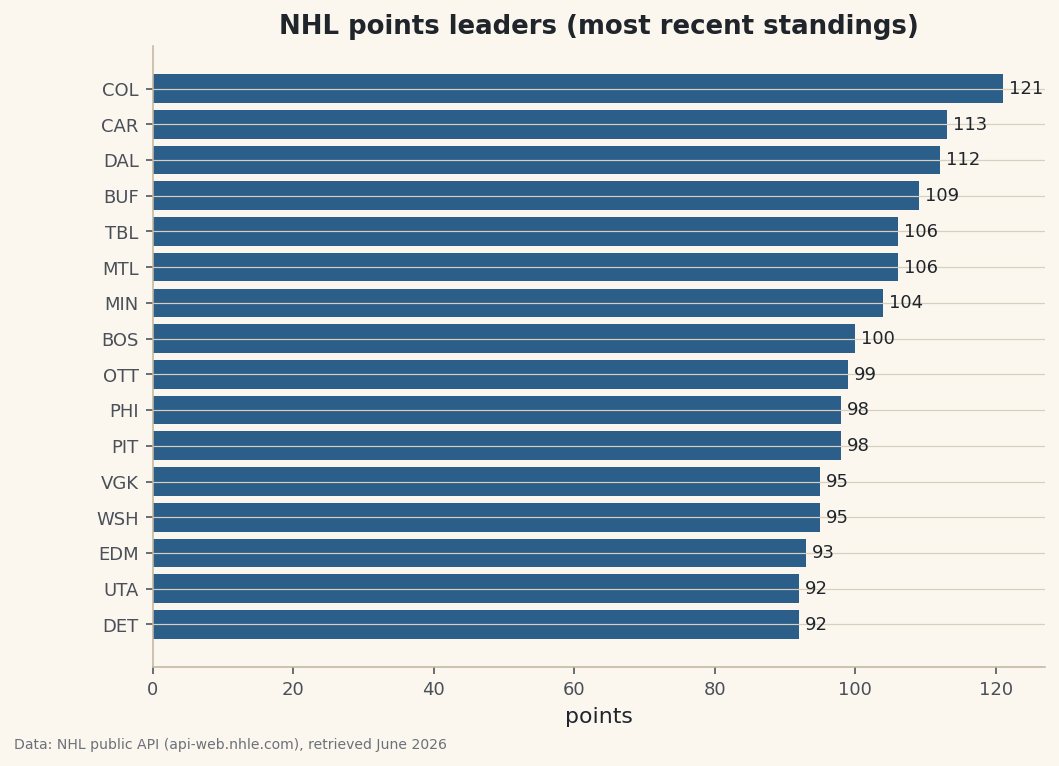
To confirm the data is genuinely usable, we plot it. We take the top 16 teams by points, sort ascending so the leader lands on top of the horizontal bars, and label each with its exact total.
python import matplotlib.pyplot as plt top = df.head(16).sort_values("PTS") fig, ax = plt.subplots(figsize=(8, 5.6)) ax.barh(top["Abbr"], top["PTS"], color="#2C5E8A") ax.set_title("NHL points leaders (most recent standings)") ax.set_xlabel("points") ax.bar_label(ax.containers[0], fmt="%d", padding=3, fontsize=9) fig.savefig("standings_points.png", dpi=144, bbox_inches="tight")Data: NHL public API (api-web.nhle.com), retrieved June 2026 From reading documentation to a finished chart in one script. That's the loop you'll repeat for every API on this site — only the endpoint and the nesting change.
-
Be polite: sessions, retries, and caching
One habit worth building from day one. APIs are shared resources, and a script that retries instantly in a tight loop can look like an attack. The
polite_sessionhelper we used sends a real User-Agent and retries on the transient failures (429, 500, 502, 503, 504) with exponential backoff — waiting progressively longer between attempts — instead of pounding the server. Pairing that with the on-disk cache shown in the downloadable script means a successful response is saved locally, so your second run reads from disk and never bothers the API again. Polite by default, fast by default; there's no reason not to.
Troubleshooting
HTTPError: 404 Not Found from raise_for_status()
The endpoint path is wrong — a typo, a missing version prefix like /v1, or an endpoint the docs renamed. Re-read the documentation's exact path and copy it character for character. A 404 is the server saying "that resource doesn't exist here," so the fix is always in the URL, not your code.
KeyError: 'default' when reading a field
You assumed a field was a plain value when it's a nested dictionary (or vice versa). Print one record — print(teams[0]) — and look at the real structure before indexing. If teamName is {'default': ...}, you need t["teamName"]["default"]; if it's already a string, drop the second lookup.
JSONDecodeError when calling resp.json()
The response body wasn't JSON — often an HTML error page returned with a non-200 status. Call resp.raise_for_status() first so a bad status fails clearly, and inspect resp.text[:200] to see what actually came back. An HTML <!DOCTYPE html> at the top means you hit an error page, not the API.
429 Too Many Requests or repeated timeouts
You're sending requests faster than the server allows, or it's briefly overloaded. Use a session with retry-and-backoff like polite_session so it waits and retries automatically, and cache responses so repeat runs don't re-request at all. If 429s persist, slow down deliberately by spacing your calls.
Challenge yourself
The standings carry far more than the eleven fields we pulled. Open one team record fully and find the goal differential, then add a Diff column (GF - GA) to the DataFrame and re-sort by it — does the points leader also lead in differential? For a real test of your doc-reading, find a different endpoint in the NHL API (a team's schedule, say), make one request, inspect its shape, and flatten it into its own table. If you can do that from the docs alone, you can consume almost any sports API on the web.
The finished script
Everything this tutorial built, assembled in one runnable file.
Download the finished script (05_how_to_read_api_documentation.py)This script imports a small shared helper (and reads any bundled sample data) that live next to it in /downloads/ — grab these into the same folder so it runs as-is: sdt_common.py. Or skip the collecting: the Working with Real Sports APIs bundle has this whole course’s scripts and data in one ZIP.