Rolling Averages and Form: Time-Series Basics for Sports
Part 9 of 12 in Statistics for Sports Data · course bundle (code + data)
What you'll build
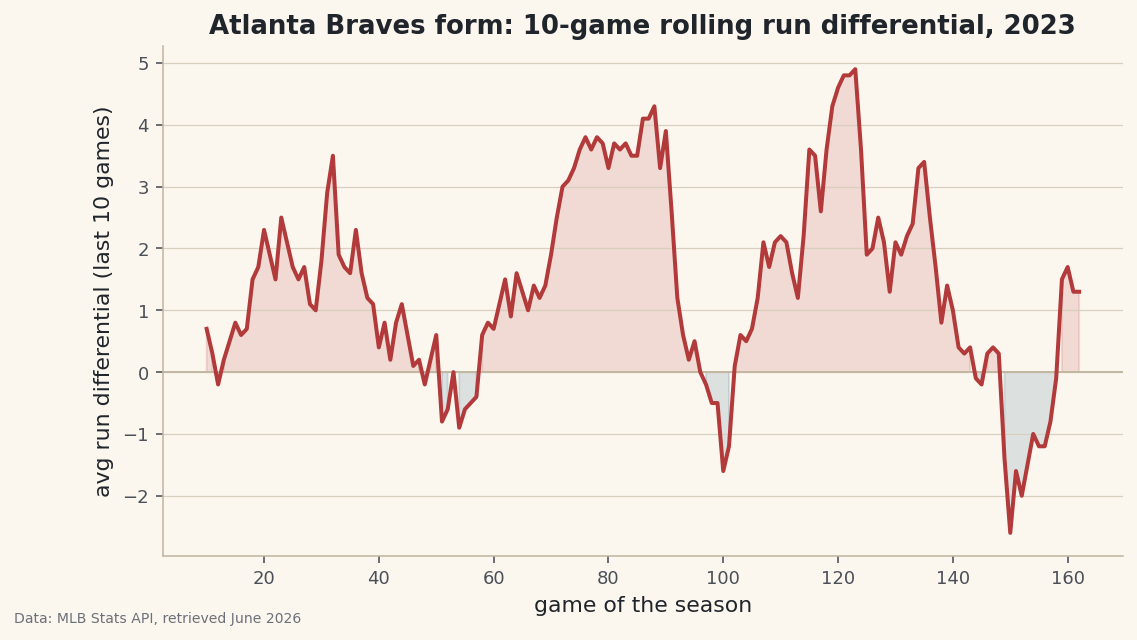
A team's 10-game rolling run differential over a full season.
"They're on a hot streak." "Their form has dipped." Sports commentary runs on the idea of momentum — but a single game is far too noisy to measure it. A blowout win one night and a one-run loss the next don't tell you whether a team is genuinely good right now. The fix is a rolling window: instead of looking at one game, you average the last ten and slide that window forward through the season. Here that means pulling the Atlanta Braves' real 2023 game log from the MLB Stats API, sorting it by date, and turning 162 jagged results into one smooth line of "form."
This builds on two earlier lessons: pandas for sports data: 12 operations for the DataFrame work, and how to read API documentation for navigating the nested JSON the schedule endpoint returns. The data comes from the MLB Stats API (statsapi.mlb.com), retrieved June 2026.
-
Request the season schedule
The MLB Stats API has a schedule endpoint that returns every game for a team in a season. We pass the team's numeric ID (144 is Atlanta), the season, and
gameType=Rto limit it to regular-season games. We use the project's polite session helper, which sets a browser User-Agent and retries automatically if the server hiccups.python import matplotlib.pyplot as plt import pandas as pd import sdt_common as sdt TEAM_ID, TEAM = 144, "Atlanta Braves" session = sdt.polite_session() data = session.get("https://statsapi.mlb.com/api/v1/schedule", params={"sportId": 1, "season": 2023, "teamId": TEAM_ID, "gameType": "R"}, timeout=30).json()The response is a big nested dictionary. At the top sits a
dateslist, one entry per calendar day the team played, and inside each day is agameslist. Real schedules nest like this because a team can occasionally play a doubleheader, so a single date may hold two games. -
Flatten the JSON into a tidy game log
Nested JSON is hard to analyze, so our first job is to walk it and emit one flat row per game. For each game we figure out whether Atlanta was the home or away side, pull our score and the opponent's, and keep only completed games. We guard against games that aren't
Final(postponed or in progress) and against missing scores.python rows = [] for day in data["dates"]: for g in day["games"]: if g["status"]["abstractGameState"] != "Final": continue home, away = g["teams"]["home"], g["teams"]["away"] us, them = (home, away) if home["team"]["id"] == TEAM_ID else (away, home) if us.get("score") is None or them.get("score") is None: continue rows.append({"date": g["gameDate"][:10], "rf": us["score"], "ra": them["score"]})The clever line is
us, them = (home, away) if home["team"]["id"] == TEAM_ID else (away, home). It checks which side is Atlanta and unpacks "us" and "them" accordingly, so the rest of the code never has to care about home versus away. We slicegameDatewith[:10]to keep just theYYYY-MM-DDpart and drop the time.rfmeans runs for,rameans runs against. -
Sort by date and engineer the form columns
Time-series analysis has one non-negotiable rule: the rows must be in chronological order before you compute anything that looks backward. We build the DataFrame, sort by date, reset the index, and then add the columns that turn raw scores into momentum.
python gl = pd.DataFrame(rows).sort_values("date").reset_index(drop=True) gl["game"] = range(1, len(gl) + 1) gl["run_diff"] = gl["rf"] - gl["ra"] gl["win"] = (gl["rf"] > gl["ra"]).astype(int) gl["roll10"] = gl["run_diff"].rolling(10).mean() gl["cum_wins"] = gl["win"].cumsum()Two new tools appear here.
rolling(10).mean()is the star of the show: for each game it averages that game's run differential with the nine before it, producing a smoothed "how have they played lately" number.cumsum()is its cousin - a running total of wins that only ever climbs, perfect for a season-long win count. The(gl["rf"] > gl["ra"]).astype(int)turns the True/False win test into 1s and 0s so it can be summed. -
Inspect the game log
Before plotting, always look at the table. We print the team's final record and the first six games so we can confirm the columns make sense.
python w = int(gl["win"].sum()) print(f"{TEAM}, 2023: {w}-{len(gl) - w} over {len(gl)} games") sdt.show_df(gl[["game", "date", "rf", "ra", "run_diff", "roll10"]], n=6)Final record and the first six gamesAtlanta Braves, 2023: 104-58 over 162 games game date rf ra run_diff roll10 0 1 2023-03-30 7 2 5 NaN 1 2 2023-04-01 7 1 6 NaN 2 3 2023-04-02 1 4 -3 NaN 3 4 2023-04-03 8 4 4 NaN 4 5 2023-04-04 4 1 3 NaN 5 6 2023-04-05 5 2 3 NaN
The header confirms a 104-58 season over 162 games - exactly the Braves' real 2023 record, which tells us the flattening logic caught every game correctly. Look at the
roll10column: it'sNaNfor the first five rows shown, and in fact stays empty until game 10. That's not a bug - a 10-game average simply can't exist until 10 games have been played. Atlanta opened hot, with run differentials of +5, +6, -3, +4, +3, +3, so you can already feel the strong start the rolling line will smooth into shape. -
Plot form as a filled line
Now the payoff. We plot the rolling differential against the game number, draw a zero line for reference, and shade above it green (playing well) and below it a contrasting color (struggling). The fill is what makes the streaks pop visually.
python fig, ax = plt.subplots(figsize=(8.6, 4.6)) ax.axhline(0, color="#C2B7A1", linewidth=1) ax.plot(gl["game"], gl["roll10"], color=sdt.sport_color("baseball"), linewidth=2) ax.fill_between(gl["game"], gl["roll10"], 0, where=gl["roll10"] >= 0, color=sdt.sport_color("baseball"), alpha=0.15) ax.fill_between(gl["game"], gl["roll10"], 0, where=gl["roll10"] < 0, color=sdt.SPORT_COLORS["hockey"], alpha=0.15) ax.set_title(f"{TEAM} form: 10-game rolling run differential, 2023") ax.set_xlabel("game of the season") ax.set_ylabel("avg run differential (last 10 games)")Data: MLB Stats API, retrieved June 2026 That single line carries a whole season's narrative. Stretches where the line rides high are hot streaks; the dips are cold spells. The
where=argument onfill_betweenis the key: it shades only the segments that satisfy the condition, so positive form gets one color and negative form another. Because the line is a 10-game average, a couple of bad games barely move it - which is exactly the noise-resistance we wanted. The flat empty start before game 10 is the rolling window filling up, just as we saw in the table.
Troubleshooting
The roll10 column is all NaN
The first nine values being empty is correct - the window needs 10 games to fill. But if the entire column is NaN, you likely have fewer than 10 rows, which usually means the date range or filters dropped too many games. Print len(gl) first; for a full regular season it should be 162.
The line jumps around erratically, like the games aren't in order
You probably skipped sort_values("date"), or sorted the column as something other than a date. Because the dates are stored as YYYY-MM-DD strings, a plain string sort happens to put them in correct chronological order - but if you reformatted the dates, sort on a real datetime column instead.
KeyError: 'score' while building rows
Not every game in the feed has a final score - postponed or suspended games don't. That's why we use us.get("score") and skip rows where it's None. If you see this error, you're indexing with ["score"] directly somewhere instead of using .get() with a guard.
Challenge yourself
Change the window from rolling(10) to rolling(20) and then rolling(5), and plot all three on the same axes. You'll see the tradeoff at the heart of time-series smoothing: a short window reacts fast but stays jittery, while a long window is smooth but slow to notice a real change. Then add a second panel that plots cum_wins against a "pace" line showing what a 95-win season would look like at each game - at which point in the season did Atlanta pull decisively ahead of that pace? For a stretch goal, swap in a different team ID (try 147 for the Yankees or 119 for the Dodgers) and compare two clubs' form on one chart.
Get the code
Want it all in one file? This is the finished script behind this tutorial - the run that produced the outputs above.
Download the finished script (22_rolling_averages_and_form_time_series_basics.py)This script imports a small shared helper (and reads any bundled sample data) that live next to it in /downloads/ — grab these into the same folder so it runs as-is: sdt_common.py. Or skip the collecting: the Statistics for Sports Data bundle has this whole course’s scripts and data in one ZIP.