Pull Your First NFL Data with nfl_data_py
Part 5 of 7 in Working with Real Sports APIs · course bundle (code + data)
What you'll build
A season of play-by-play loaded into pandas, with a plays-per-team summary.
Football might be the most data-rich sport in America, and nearly all of the public play-by-play traces back to one place: nflverse, a community project that quietly publishes every play of every game as free, tidy data files. It's a genuinely remarkable resource, and most people don't know it exists. We'll load a full 2023 season, glance at the schedule, and draw a pass-vs-run chart that shows at a glance which offenses lived through the air - finishing with a season of NFL data sitting in a DataFrame, ready for everything that comes after.
There's one wrinkle we need to deal with honestly up front. The library everyone reaches for, nfl_data_py, is broken on a modern Python install - and I'll show you exactly why, and a clean way around it. If you've already done the 12 essential pandas operations, every move here will feel familiar; this is just those same tools pointed at a bigger, more exciting dataset.
-
Understand the
nfl_data_pyproblem firstYou'll find
nfl_data_pyin every tutorial and forum post about NFL data, so let's be clear about why we're not importing it directly. The library pinspandas<2.0andnumpy<2.0, and deep inside it still callsDataFrame.append()- a method pandas removed in version 2.0. On a current install it either refuses to install or, if you force it, crashes withAttributeError: 'DataFrame' object has no attribute 'append'. That's not your fault and it's not a bug in your code.Here's the key insight: under the hood,
nfl_data_pyisn't doing anything magical. It just downloads nflverse's public parquet files over HTTPS. So we can read those exact same files ourselves with one line of pandas and skip the broken dependency entirely. That's what our smallsdt_nflversehelper does, and it deliberately copiesnfl_data_py's function names so the code reads the same either way.If you're on a clean machine and would rather use the real library, the supported recipe is to make a fresh virtual environment pinned to the old pandas first, then install it:
python # OPTION A - the real library, in a fresh venv (needs old pandas) python -m venv nfl-env nfl-env\Scripts\activate # Windows (use: source nfl-env/bin/activate on macOS/Linux) pip install "pandas<2.0" "numpy<2.0" nfl_data_py # then in your script: import nfl_data_py as nflWe'll take Option B - read the parquet directly - because it works on any modern setup and teaches you what the library was doing all along.
-
Load a season of play-by-play, columns first
Our helper exposes
import_pbp_data, the same namenfl_data_pyuses. The one habit worth forming immediately: pass acolumnslist. A full season of play-by-play has hundreds of columns and is roughly 20 MB on the wire; asking for only the seven we need makes the read noticeably quicker because parquet can pull just those columns off disk.python import matplotlib.pyplot as plt import sdt_common as sdt import sdt_nflverse as nfl # our drop-in; mirrors nfl_data_py's function names sdt.init("pull-your-first-nfl-data-with-nfl-data-py") # Pulling only the columns we need keeps the 20 MB file quick to read. pbp = nfl.import_pbp_data([2023], columns=[ "game_id", "posteam", "play_type", "pass", "rush", "epa", "yards_gained"])Note that
import_pbp_datatakes a list of years, even for a single season - that's deliberate, so you can ask for several seasons at once later.posteamis the team with possession (the offense on that play), andepais Expected Points Added, which we'll dig into in the next tutorial. -
Check what you loaded
Always look at your data before you trust it. We print the row count and show a handful of real plays. The
sdt.show_dfhelper just prints the first few rows trimmed to fit a narrow column - nothing you couldn't do with.head().python with sdt.snippet("shape"): print("Plays in the 2023 season:", f"{len(pbp):,}") sdt.show_df(pbp[["game_id", "posteam", "play_type", "yards_gained", "epa"]].dropna(), n=6)A full season, loadedPlays in the 2023 season: 49,665 game_id posteam play_type yards_gained epa 1 2023_01_ARI_WAS WAS kickoff 0.0 0.000000 2 2023_01_ARI_WAS WAS run 3.0 -0.336103 3 2023_01_ARI_WAS WAS pass 6.0 0.703308 4 2023_01_ARI_WAS WAS run 2.0 0.469799 5 2023_01_ARI_WAS WAS pass 0.0 -0.521544 6 2023_01_ARI_WAS WAS pass 12.0 1.173155Just under 50,000 plays for the whole season - that's every snap, kickoff, and punt across all 285 games of the 2023 season: the 272-game regular season plus its 13 playoff games (six wild-card, four divisional, two conference championships, and the Super Bowl - which is why the schedule below runs to index 284 and week 22). Notice the
game_idformat:2023_01_ARI_WASreads as season, week, away team, home team. That single column tells you almost everything about when and where a play happened, and you'll lean on it constantly. The first row is a kickoff with an EPA of exactly 0, while the pass on the next line added about 0.70 expected points - your first taste of how EPA scores individual plays. -
Pull the schedule
Play-by-play tells you what happened inside games; the schedule tells you the games themselves - matchups, final scores, weeks. Our helper's
import_schedulesreads nflverse's one combined games file and filters to the season you ask for.python schedule = nfl.import_schedules([2023]) with sdt.snippet("schedule"): cols = ["week", "away_team", "away_score", "home_team", "home_score"] print("A few games from the schedule:") sdt.show_df(schedule[cols].dropna().tail(6), n=6)The tail of the 2023 scheduleA few games from the schedule: week away_team away_score home_team home_score 279 20 GB 21.0 SF 24.0 280 20 TB 23.0 DET 31.0 281 20 KC 27.0 BUF 24.0 282 21 KC 17.0 BAL 10.0 283 21 DET 31.0 SF 34.0 284 22 SF 22.0 KC 25.0Because we took the tail, these are the last games of the season - and there it is: week 22,
SFatKC, final score 25-22. That's Super Bowl LVIII. The schedule is the backbone of any standings or win-rate analysis, which is exactly how we'll use it in the capstone tutorial. -
Count pass vs run plays by team
Now a real question: how pass-happy is each offense? We keep only ordinary pass and run plays, then use
pivot_tableto count plays per team for each play type. Usingaggfunc="size"counts rows, so the value column we pass doesn't matter much - we're tallying how many plays of each kind each team ran.python # How pass-happy is each team? Count pass vs run plays by offense. plays = pbp[pbp["play_type"].isin(["pass", "run"])] by_team = plays.pivot_table(index="posteam", columns="play_type", values="epa", aggfunc="size", fill_value=0) by_team["total"] = by_team["pass"] + by_team["run"] by_team = by_team.sort_values("total")Sorting by
totalputs the busiest offenses at the top of the chart (matplotlib draws horizontal bars from the bottom up). Thefill_value=0guards against any team-and-type combination that somehow had no plays, so we never get a strayNaNin the bars. -
Draw the stacked bar chart
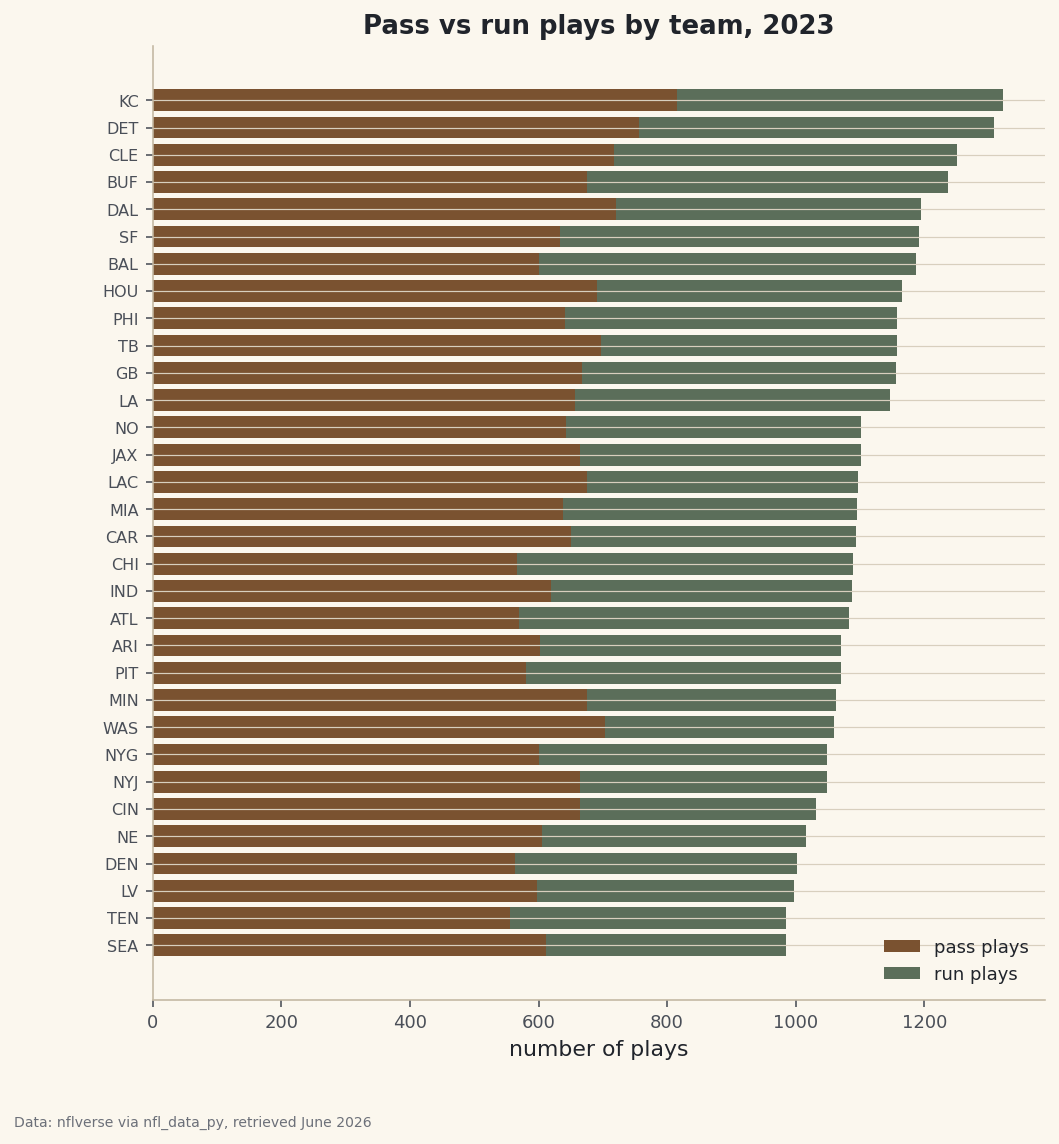
A stacked horizontal bar is the right picture here: each team gets one bar, split into its pass portion and its run portion. We draw the pass plays first, then stack the run plays on top by setting
left=to where the pass bar ended.python fig, ax = plt.subplots(figsize=(8, 8.6)) ax.barh(by_team.index, by_team["pass"], color=sdt.sport_color("football"), label="pass plays") ax.barh(by_team.index, by_team["run"], left=by_team["pass"], color=sdt.SPORT_COLORS["foundations"], label="run plays") ax.set_title("Pass vs run plays by team, 2023") ax.set_xlabel("number of plays") ax.tick_params(axis="y", labelsize=8) ax.legend(loc="lower right", fontsize=9, frameon=False) sdt.save_fig(fig, "pass_run_by_team", source="nflverse via nfl_data_py")Data: nflverse via nfl_data_py, retrieved June 2026 The
sdt.save_fighelper stamps every chart with its data source and the date it was retrieved - here, nflverse, retrieved June 2026 - so the provenance always travels with the image. Read the chart by comparing the length of each color: a long brown segment relative to the green means a pass-leaning offense. The bar lengths also reflect pace - teams that run more total plays (faster offenses, more overtime) reach further right regardless of their pass-run mix.
Troubleshooting
AttributeError: 'DataFrame' object has no attribute 'append'
This is the classic nfl_data_py failure on a modern install. The library still calls DataFrame.append(), which pandas removed in 2.0. You have two choices: use our sdt_nflverse helper (it reads the same nflverse parquet files with pandas.read_parquet and never calls .append()), or create a fresh virtual environment pinned to pandas<2.0 and numpy<2.0 before installing the real library, as shown in Step 1. Do not pin old pandas in your main environment - it will break your other tutorials.
pip refuses to install nfl_data_py at all
Same root cause from the other direction: its pinned pandas<2.0 requirement conflicts with the modern pandas already in your environment, so the resolver gives up. This is expected. Use the helper, or isolate the install in its own venv.
ImportError: pyarrow when reading the parquet
Reading parquet files needs the pyarrow engine under the hood. Install it with pip install pyarrow and re-run. It ships with the build requirements for this site, so you only hit this on a bare environment.
The first read is slow, then fast
The play-by-play file is about 20 MB and streamed over HTTPS, so the first read takes a few seconds. Passing a columns list (as we did) trims that considerably because parquet only pulls the columns you ask for. If it feels stuck, give it 15-20 seconds before worrying about your connection.
Challenge yourself
Turn the raw play counts into a rate: compute each team's pass share as pass / (pass + run) and sort by it. Which offense was the most pass-happy in 2023, and which leaned hardest on the run? Then load a second season by passing [2022, 2023] to import_pbp_data and see whether the league as a whole threw the ball more often year over year. Watch how cleanly the same pivot_table handles two seasons at once.
Download the script
The full script, ready to run - the finished script that generated every figure on this page.
Download the finished script (15_pull_your_first_nfl_data_with_nfl_data_py.py)This script imports a small shared helper (and reads any bundled sample data) that live next to it in /downloads/ — grab these into the same folder so it runs as-is: sdt_common.py, sdt_nflverse.py. Or skip the collecting: the Working with Real Sports APIs bundle has this whole course’s scripts and data in one ZIP.